
Step by step
How to record and transcribe a conversation on your phone
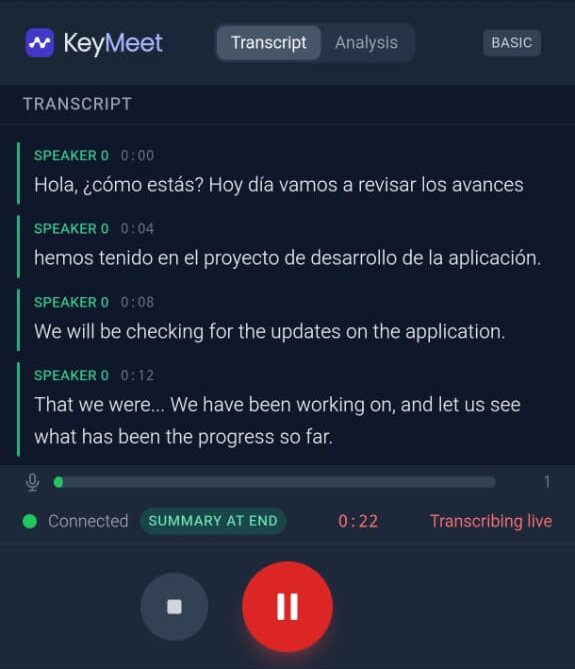
Open KeyMeet on your phone or in your browser, press record and set the phone between the people talking. The transcript appears live as you speak, in English, Spanish or both, and when you end you get a summary, key points and action items.
No credit card required

What you get when the meeting ends
Example: a sample 80-second consultation in Spanish and English, and the notes KeyMeet's AI wrote from it, in English.
The conversation (excerpt)
Client
Buscamos una casa de tres habitaciones, con patio para los niños, cerca de la escuela Lincoln.
Client
Hasta trescientos ochenta mil dólares. Ya hablamos con el banco y nos precalificaron.
Client
And my husband asked about the HOA fees. We don't want to pay more than two hundred dollars a month.
Agent
Encontré dos casas en Maple Street que cumplen con todo. ¿Las vamos a ver el sábado a las diez?
The notes
Key decisions
- Search criteria set: three bedrooms, a yard, near Lincoln Elementary, budget up to $380,000, HOA under $200/month.
- Rosa and her husband will view two Maple Street houses on Saturday at 10:00 with their children.
Action items
- Email the bank pre-qualification/pre-approval letter to Daniel Rosa · Thursday (this week)
- Confirm both Maple Street showings for Saturday at 10:00 Daniel · Before Saturday at 10:00
- Email the HOA documents for the Maple Street houses to Rosa Daniel · Before Saturday's showings
Step by step
- 1
Open KeyMeet
Use the Android app, or any modern browser on your phone or laptop. Sign in with Google.
- 2
Press record
Set the phone on the table between the people talking. You don't need to pick a language first.
- 3
Talk normally
The transcript appears live. You can ask the AI assistant questions about what was said while the conversation is still going.
- 4
End and get your notes
A summary, key points and action items, ready to share or download.
Tips for a clear transcript
Phone in the middle
Put it between the speakers, not at one end of the table. Distance matters more than the app.
Cut background noise
Close the door, turn off music, and keep the phone away from fans and coffee machines.
One voice at a time
Crosstalk is hard for any transcription. Short pauses between speakers help a lot.
Mix languages freely
English and Spanish in the same conversation is fine. Both are transcribed as they are spoken.
When people use it
Client visits, consultations, interviews, on-site walkthroughs and team meetings in a room: any conversation where you need to listen instead of typing, and still want every detail written down afterwards.
Pricing
Free
$0
60 min/month, live AI included
Pro
$12/mo
600 min/month + 900 min of uploaded files
Business
$25/account
2,000 min/month per account, team features
Questions
Do I need a special recorder?
No. Your phone or laptop is enough. KeyMeet runs in the Android app or in any modern browser, so there's no device to buy.
What if the conversation switches between English and Spanish?
That's fine. The transcription runs in multilingual mode, so both languages land in the same transcript as they're spoken. The summary is written in the language your app is set to.
How long can a recording be?
On the free plan, up to 30 minutes per conversation and 60 minutes a month. Pro has no per-conversation limit.
Do you keep the audio?
No. Your audio isn't stored on our servers: it's transcribed live and only the text stays in your account, where you can delete it anytime. If your connection drops mid-meeting, the app briefly holds the audio on your device and deletes it right after it's uploaded.
How much does it cost?
There is a free plan with 60 minutes a month (up to 30 minutes per meeting) and no credit card. Pro is $12/month for 600 minutes with no per-meeting limit; Business is $25 a month per account for 2,000 minutes a month per account. Uploaded audio files have their own monthly minutes: 30 on Free, 900 on Pro.